EN
EN
As per SEBI and AMFI guidelines, what is commonly referred to as a “Change of Broker (COB)” in mutual funds is formally known as a Change of Distributor (ARN change) for investments held in Statement of Account (SOA/physical mode). This process updates the distributor code linked to a folio but does not change ownership of units.
A Change of Distributor (ARN) applies only to mutual fund investments held in SOA mode. It does not apply to Demat holdings. For Demat investments, visibility and transaction capability depend entirely on the Demat account where the units are held, not on distributor mapping.
Key Takeaways
-
A Change of Distributor applies only to Regular Plan folios held in SOA mode.
-
Missing portfolios or blocked transactions can occur when holdings are not correctly mapped, transferred (in case of demat units), or identified under the correct holding mode.
-
Change of Distributor (ARN) is applicable only to regular plans. Direct plans do not have distributor mapping and hence cannot undergo ARN change.
-
A Change of broker (ARN change) does not impact the NAV, taxation, holding period, or ownership of mutual fund units.
Why Your Mutual Fund Portfolio May Not Show After a Broker Transfer (COB)
The Problem: Missing Portfolio or Blocked Withdrawals
Even after completing the COB to Angel One, some investors face the following issues:
-
Certain mutual fund schemes are not visible in the app
-
Withdrawal or switch options are disabled or result in an error
-
In some cases, even after a switch is processed, the withdrawal remains blocked
These situations can be frustrating, especially when the COB appears to have gone through.
When Does This Happen?
These issues typically arise when the investment is held in a different mode than the platform expects. For example:
-
The units may still be lying in the earlier Demat account.
-
The Demat transfer may not have been completed.
-
A physical or SOA holding may have been incorrectly treated as Demat.
In such cases, the platform may look for the units in the wrong place and fail to reflect them correctly.
Note: Mutual fund units held in demat form are governed by SEBI depository regulations and are maintained with depositories such as NSDL and CDSL, whereas SOA holdings are maintained by the AMC or its Registrar and Transfer Agent (RTA).
Also Check Out: Mutual Fund Plans Online in India
How Does This Happen?
Let’s walk through a few real scenarios:
Case 1: Units still held in the previous broker’s Demat account
-
The distributor update or account modification may have been completed, but the actual mutual fund units may still remain in the earlier Demat account if a separate transfer instruction was not executed.
-
As a result, the units do not appear in the updated account, and transaction attempts may fail until the transfer is completed.
Case 2: DIS Submitted but transfer process not completed
-
This can happen when an investor submits a Delivery Instruction Slip (DIS) but the instruction is not executed or validated by the Depository Participant (DP).
-
A DIS must be correctly filled, matched with depository records, and processed within validity timelines.
-
If the instruction is rejected, expired, or not processed, the mutual fund units will remain in the existing demat account.
Case 3: Folio in physical mode treated as Demat
-
In some cases, a mutual fund folio that is actually held in physical or SOA mode may be incorrectly identified as Demat.
-
The app then tries to locate the units in a Demat account, finds nothing, and blocks the redemption or switch request.
-
Once the holding type is corrected, transactions can proceed normally.
What Should You Do?
Here are the appropriate actions based on how your mutual fund units are held:
If units are still held in the previous demat account
-
Submit the required transfer request through your Depository Participant to move the mutual fund units from the earlier Demat account to the updated one.
-
Also complete any supporting formalities and keep the acknowledgement for reference.
-
Until the transfer is completed and the units appear in the linked Demat account, redemption or switch requests may not go through.
If the investment Is in physical mode
-
If the app shows the units as unavailable but you know the investment is not in Demat form, it may be a classification issue.
-
In such cases, the holding type should be verified with the registrar and transfer agent.
-
Once the folio is correctly identified as physical or SOA mode, the system should reflect it properly and redemption requests can usually be placed without issue.
Also Read About: What happens if your Delivery Instruction Slip gets Rejected?
Other Scenarios to Be Aware Of
Folio is in Physical Mode But Treated as Demat
Incomplete or incorrect data from the RTA may cause folios to be wrongly identified. If this happens, the app expects to find units in the Demat account, and when it does not, it blocks the transaction. Once the folio is correctly recognized as Physical, you can proceed with redemptions.
Units Not Transferred Despite COB Completion
A common misconception is that completing COB also transfers the units. In reality:
-
A Change of Broker request updates the applicable broker mapping or servicing details for eligible investments
-
The actual transfer of units may require separate transfer instructions, depending on how the holdings are maintained
-
Additional transfer formalities or supporting documents may be required before the transfer is completed
-
If the required transfer steps are not completed, the units may remain linked to the earlier account and may not appear in the updated portfolio view.
Note: In some cases, mutual fund folios may become inactive due to lack of transactions or incomplete KYC compliance. As per SEBI’s latest KYC norms, investors must have a “KYC Validated” status to carry out transactions without restrictions. Investors with “KYC Registered” or “KYC On Hold” status may face limitations until validation is completed through a KYC Registration Agency (KRA).
Required Documents
1. Change of Broker / ARN Request Form
2. Self-attested ID Proof (Aadhar Card or PAN card)
3. Portfolio Statements
Step-by-Step Process
1. Download the “Change of Broker / ARN” form.
2. Fill in the required details, including:
o Mutual Fund and Date
Enter the Mutual Fund name and date of submitting the change of broker form.

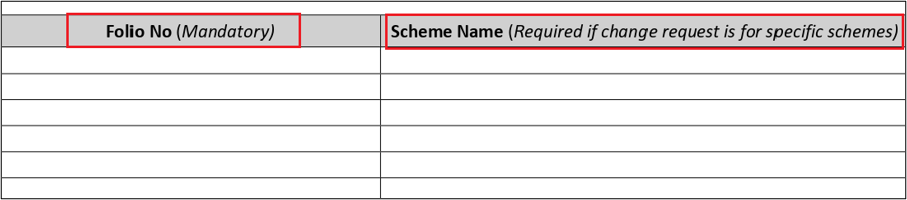
o Folio number(s) and Scheme Name
Enter the Folio number in which you have units and the Scheme name in the below space. (Mandatory fields)
o Old ARN and new ARN (Code and Name)
Enter the Old ARN Code, Old ARN name, New ARN code, New ARN Name and new EUIN code in the space below.
The new Sub ARN Code is not mandatory; it is only filled if applicable.
Angel One Broker Details for Reference:
Regular Plan ARN: ARN-77404
Direct Plan ARN: INZ000161534
If you want to map your scheme under a sub-broker, the EUIN number of the sub-broker needs to be mentioned.
In the case of a direct scheme, there is no requirement of an EUIN number.

o Investor Name and Signatures of all holders
The holders should enter their Name and do their complete signature in the order of their names in the account.

3. A self-attested copy of your Aadhar Card or PAN card must be attached with the filled Change of Broker form.
4. Submit the form at the Angel One Head Office. Below are the Courier address details.
Angel One
5th Floor, Akruti Star
MIDC, Chakala Road
Andheri East
Mumbai – 400093
5. Processing Time: Approximately 10-12 business days
RTA process:
-
·Upon receiving the request, AMC/RTA will send an SMS on T+1 day to the investor.
-
If no complaint is received by T+11 from investor about Change of Broker, the change will be processed. Confirmation will be sent to the investor through Email/SMS and to both the Mutual Fund Distributors (source and target) via Mail.
Important Notes
-
After the change of broker process is completed, once units are reflected in the client's portfolio (to reflect the historical NAV), then transfer the units from Other DP to Angelone DP.
-
As per AMC guidelines, a separate Change of Broker form is required for each AMC.
-
Requests with incomplete signatures or mismatched details may be rejected.
-
If scheme is under the lock-in period, the change of broker will not be processed.
Also Read About: Discount Broker Vs Full-service Broker
Conclusion
A Change of Distributor (ARN change) updates the servicing rights of a mutual fund folio but does not move or remap the actual units across holding modes. Investors may face visibility or transaction issues if units remain in a different Demat account or if the holding mode is incorrectly identified.
Verifying the holding structure through CAS, ensuring proper transfer of Demat units, and confirming folio classification with the RTA are essential steps to ensure seamless access and transaction capability.
Turn insights into action - Open Free Demat Account with Angel One and start investing instantly.